Migration guide
How to switch from Mediahawk to CallTracker
Switching from Mediahawk to CallTracker means new tracking numbers, because numbers cannot be ported in. You run both tools side by side while the new numbers take over: the website and online listings can move the same day with US or Canadian numbers (about 6 business days for the first number in most other countries, because of the regulatory review), and printed placements move when you replace them.
Before you decide
Mediahawk is a UK marketing attribution platform that tracks calls, forms and chat, from £199 per month.
Stay with Mediahawk if: You want form and chat conversions tracked in the same tool as calls. You want onboarding and training included in the subscription. You use Mediahawk's sales matching on Professional.
What moves and what does not
| What | How it moves |
|---|---|
| Tracking numbers | New numbers. CallTracker cannot port numbers in, so you order a new number per placement and keep your Mediahawk numbers active until calls to them stop. |
| Placements and campaigns | Recreated by hand: one placement per ad, listing, sign or traffic source, each with its own number. There is no importer. |
| Website number swapping | Replace the Mediahawk script with the CallTracker dynamic number insertion snippet. Do not run both swapping scripts on the same page. |
| Call history and recordings | Not imported. Export them from Mediahawk before your access ends; CallTracker starts recording history from your first tracked call. |
| CRM logging | Reconnect in Settings → CRM: HubSpot, Salesforce and Pipedrive log each call on the matching record, and new callers create one. |
| Google Ads call conversions | Connect Google Ads with your Google login in Settings → Conversion tracking (available once Google approves CallTracker's API access) and choose the conversion action calls should count toward. |
| GA4 and Meta call conversions | Enter your GA4 Measurement ID and API secret, or your Meta dataset ID and Conversions API token, in Settings → Conversion tracking. |
Step by step
Step 1 · Day 0
Check your contract and export your data
Mediahawk offers monthly and annual subscriptions. On a monthly plan you can switch at any time; on an annual plan, time the switch to the end of the term. Export call logs and any recordings you want to keep from Mediahawk.
Step 2 · Day 0, a few minutes
Create your CallTracker account
Sign up with a business email, subscribe to CallTracker Pro and top up prepaid credits for numbers and minutes.
Step 3 · Seconds in the US and Canada; about 6 business days for the first number elsewhere
Order tracking numbers
US and Canadian numbers are provisioned instantly. Most other countries need a regulatory bundle (business registration and proof of address): CallTracker checks it, then Twilio reviews it — Twilio states "The review process generally takes up to three business days, but in some regions it might take several weeks." Submit the bundle as soon as your account exists, so the review runs while you prepare the rest.
Step 4 · As soon as the numbers are live
Switch your website and online listings
Install the CallTracker snippet in place of the old one, then update the numbers on Google Business Profile, directories and online ads.
Step 5 · Same day
Reconnect integrations
Connect your CRM, Slack or Microsoft Teams alerts, webhooks or Zapier, and Google Ads offline conversions.
Step 6 · On your normal print and media cycle
Replace printed and broadcast numbers
Billboards, vehicle wraps, flyers and radio spots keep the Mediahawk number until you replace them. Keep those numbers active in Mediahawk until they no longer ring.
Step 7 · When the old numbers go quiet and your term ends
Cancel Mediahawk
Check the last weeks of call logs on both tools first so no live placement still points to an old number.
What the regulatory step looks like
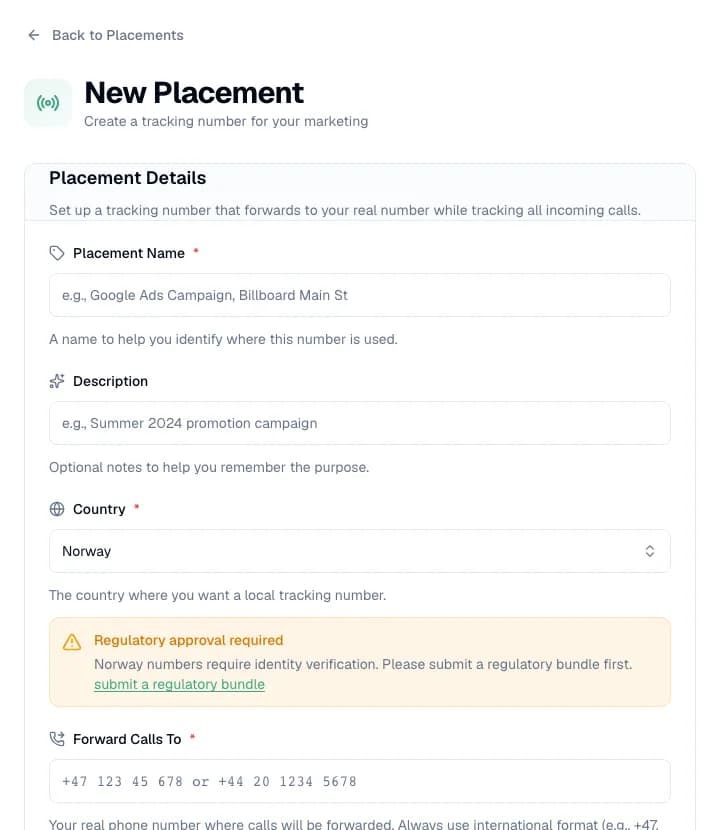
Outside the US and Canada, the New Placement form asks for an approved regulatory bundle before a number can be issued. Every step, who does it and its stated time are listed in how long it takes to get a tracking number.
What it costs on CallTracker
- One plan, CallTracker Pro: €9 per month or €90 per year, plus usage from prepaid credits.
- Each tracking number costs €1.90 to €5.70 per month depending on the country (published for 19 countries). Connected minutes are billed per started minute at the country rate; missed calls are free.
- No contract and no minimum term; cancel at any time.
- No free trial and no free plan.
Limits to know before you switch
- No free trial.
- Numbers cannot be ported in or out.
- No SSO/SAML; the REST API is read-only.
- Phone calls only: no form or chat conversion tracking.
- Support by email in English and Norwegian.
Setup guides
Facts about Mediahawk come from its own public pages, checked on 25 October 2026. They may have changed since.
Start your switch from Mediahawk
€9 per month base, plus usage. No contract. US and Canadian numbers are ready in seconds.